Introduction
This book is a collection of links for tooling and challenges for AFNOM sessions over the 2025-26 period.
Linux Installfest
See our Linux Installfest Setup Guide.
Intro to Linux + Hacking
Useful links
Today's Challenges
For picoctf, sort by Easy difficulty and have a go at any challenges that seem interesting to you! Keep in mind that fewer solves on a challenge probably means its harder.
If you are doing Bandit or Leviathon, then read the respective homepage, which tells you how to get started. Each level has a password you need to enter it, so make sure to write them down as you find them!
If you are struggling then talk to your friends and the people around you! Remember you can always look stuff up too, and if you're really struggling then ask someone in an AFNOM hoodie. We want everyone to have fun and have a good time learning something new!
Happy Linux hacking!
Web Hacking
Today's Challenges
- Beginner-Intermediate: Natas
- Wargame. More structured. Better for trying out and learning.
- Intermediate-Advanced: w3challs
- Standalone challenges. More like CTF competitions.
If you are doing Natas, then read the respective homepage, which tells you how to get started. Each level has a password you need to enter it, so make sure to write them down as you find them!
Each challenge on w3challs has its own page that links to the challenge. If you want to submit flags and earn points then you will need to make an account. Remember, generally, less solves = harder challenge!
If you are struggling then talk to your friends and the people around you! Remember you can always look stuff up too, and if you're really struggling then feel free to ask someone in an AFNOM hoodie. We want everyone to have fun and have a good time learning something new!
Happy Web hacking!
Web proxies
Some web challenges are easier to solve if you have a proxy to capture and edit web requests. We recommend ZAP (a free and open source tool). Alternatively, you can install Burp Suite which is a proprietary tool with similar features. For this session, you probably won't need a proxy but if you want to install one, here are instructions for recent versions of Ubuntu (the process is similar for other Linux distros):
ZAP
- On some systems, you can install ZAP with your package manager by installing the
zaproxypackage but if it isn't available (like on Ubuntu), follow the instructions below - First, you'll need to install Java, to do this on Ubuntu, run the following:
sudo apt install default-jre
- Then, download the ZAP installer from https://www.zaproxy.org/download/, select the "Linux Installer" option
- Once the file has downloaded, open the terminal, navigate to the directory you downloaded the file in and run
chmod +x ZAP_*_unix.sh
sudo ./ZAP_*_unix.sh
- You can run the above commands with the exact name of the file you downloaded, the example above uses the wildcard (
*) so it works regardless of the version of the installer - Go through the setup wizard and leave all options as their defaults
- Launch ZAP as you would launch any other app, select 'no' when asked if you would like to persist your session
- Click 'Manual explore' and type in the URL of the challenge's website, click 'Launch Browser'
- If it works, you're done! On Ubuntu, however, it's likely you'll get an error saying it can't find the browser
- To fix this, click on 'Tools' in the toolbar, find 'Options', select 'Selenium' and change the geckodriver path to
/snap/bin/firefox.geckodriver, the browser should now be able to launch - ZAP should now be working
Burp Suite
- Download the Burp Suite installer from https://portswigger.net/burp/releases/community/latest
- Once the file has downloaded, open the terminal, navigate to the directory you downloaded the file in and run these commands (without
sudo)
chmod +x burpsuite*.sh
./burpsuite*.sh
- Go through the setup wizard and leave all options as their defaults
- Launch Burp Suite as you would launch any other app, (reluctantly) accept the terms and conditions and click next and then 'Start Burp'
- Select the 'Proxy' tab of the top bar and click the 'Open browser' button
- If the browser launches, you're done! However, if you're on a newer version of Ubuntu, it's likely nothing will happen when you press that button
- To fix this, run the following commands:
Warning! These commands give the browser's sandbox root permissions which makes it less secure. After running this, don't use Burp browser for anything other than hacking challenges.
sudo chown root:root ~/BurpSuiteCommunity/burpbrowser/*/chrome-sandbox
sudo chmod 4755 ~/BurpSuiteCommunity/burpbrowser/*/chrome-sandbox
If you want a more secure (but more complicated) fix, see this page: https://anthonyhanel.me/posts/Fixing-Burp-Suite%27s-Default-Browser-Ubuntu-24.04/
- Burp Suite should now be working
OSINT
Handy tools
- Collection of tools
- Google search parameters
- Advanced search
- TinEye
- Social Media sites
- Exiftool
Today's Challenges
- TryHackMe Sakura
- seintpl's OSINT Practice
- Our hosted challenges from past CTFs - Go to the 'OSINT' category
You will need an account for TryHackMe.
For seintpl's practice, clone the repo and follow the instructions to work through the zips.
If you are struggling then talk to your friends and the people around you! Remember you can always look stuff up too, and if you're really struggling then feel free to ask someone in an AFNOM hoodie. We want everyone to have fun and have a good time learning something new!
Happy OSINTing!
Steg + Forensics
Handy tools
- Steghide - hides files inside images
- Install via you package manager e.g.
sudo apt install steghide
- Install via you package manager e.g.
- Audacity - viewing and editing sound files
- Stegsolve - View layers and permutations of an image
- Install Java (if you haven't already)
- Navigate to the folder you want to run stegsolve from (using
cd) wget http://www.caesum.com/handbook/Stegsolve.jar -O stegsolve.jarchmod +x stegsolve.jar- Then to start Stegsolve -
java -jar stegsolve.jar
- John the ripper - password cracking
- Install via your package manager e.g.
sudo apt install john
- Install via your package manager e.g.
- Linux commands -
strings, binwalk, compare, file, exiftool
Today's Challenges
- Steg category on our CTFd
- PicoCTF forensics challenges
- Want to try some we don't have solutions to? Take a look in this Google drive folder
- Let us know if you solve any that aren't on our CTFd yet!
If you are struggling then talk to your friends and the people around you! Remember you can always look stuff up too, and if you're really struggling then feel free to ask someone in an AFNOM hoodie. We want everyone to have fun and have a good time learning something new!
Happy STEGing!
Binary Exploitation/PWN
- Today's session is on one of the harder, more technical categories you will come across!
- It is the perfect category for learning how computers execute code at a low level
- Don't get too overwhelmed or intimidated though, with some time and practice it can be one of the most rewarding categories!
- Due to it being a bit more of a difficult session we have also provided today's slides for you to reference if you need!
Useful tools for today!
- Disassembler/Decompiler - there are a few options so choose what looks best to you!
- Ghidra - Open Source, made by the NSA, been around for a long time so very mature with good ISA support
- IDA - Closed source, used widely by professionals, free version available (need to make an account), only supports x86 + cloud decomp, fairly intuative and easy to use
- Binary Ninja - Partial open source, newer than the other two but gaining a lot of popularity, free version available, everything runs locally
- GDB (The GNU Debugger) - debug binaries, look at execution and memory, test your payloads, would recommend installing PwnDBG or GEF as they provide nice register/stack/code views
- pwntools - Python library for automating solves so you don't have to manually copy and paste your leaks and payloads all the time
- whilehex - input raw hex bytes from the commmand line
- Its worth putting this in your bashrc/zshrc/whatever you have as an alias
alias whilehex = 'while read -r line; do echo -e $line; done', then you can use it aswhilehex | ./[binary] - Now you can type raw and non printable hex bytes into you programs using the format '\xXX'
- Its worth putting this in your bashrc/zshrc/whatever you have as an alias
Today's challenges
- Pwn category on our CTFd
- If you haven't registered an account yet make sure to grab the registration key from #logins on our discord!
- PicoCTF pwn category
If you are struggling then talk to your friends and the people around you! Remember you can always look stuff up too, and if you're really struggling then feel free to ask someone in an AFNOM hoodie. We want everyone to have fun and have a good time learning something new!
Happy PWNing!
Session 6 - CSAW Recap + Hack 'n' Chill
- Today we're recapping some challenges from a recent CTF we did
- We also wanna give time for hack 'n' chill so you can give them a go or practise challenges from another session we have done
- We highly recommend having another go at challenges from last week's PWN session!
- Remember: practice makes perfect!
Today's challenges
- CSAW qualifiers challenges
- CSAW finals challenges
- Have another go practise some of last week's PWN!
- Or anything thats interested you on our CTFd!
AFNOM NETWORKING
Useful Links/Resources
Tools
We're going to be doing some immersive labs as a warm up, then playing around with the chals below, and finally some CTF chals :)
JUST ASK
Challenges
We've written a few short simple challenges to do on your own computer, where you'll carry out some tasks while recording them in wireshark and take a look at what you find. There'll be some overlap with the immersive chals but don't worry, skip over any bits you don't feel like doing, it's just for fun :)
Each challenge comes with some resources for if you don't know how to get started, with maybe some helpful linux commands to use.
Challenge credit: neko3
0: Interfaces
On linux play around with the ip command (pro tip: use the magical -c option)
I want you to briefly take a look at the output, try to figure out what most of it means (if you don't know just ask, either someone else will know or you can figure it out together :)). I want you to work out what interface(s?) you're currently using for your m,ain connection to the internet.
Resources:
ip addrman ip- HowToGeek how to use ip command on Linux
Task 1: Wireshark
Turn on wireshark and start live recording whichever interface you think you're using for your connection. Throughout these chals I want you to take a look at what the commands you write look like ont he wire and it's really interesting!
hint: Wireshark will show a graph of which ones are in use and which aren't, use this. Also if you think you got the right one but can't see amy traffic, you didn't pick the right one.
1: DNS-1
Manually find the IP address of afnom.net and of wtctf.afnom.net. Take a look at the DNS traffic in wireshark and see if you can follow the flow of what happened, how you asked for the information and how you were answered.
Resources:
man nslookupman dig- Linux nslookup command
2: OS from PING
Now ping the IP address you retrieved for part 1. Look at this in wireshark, and see what packet types ping uses.
See if you can use a cool networking trick to work out what Operating System the afnom.net server is running.
Resources:
3: traceroute
traceroute is a command that uses ping to trace which route a packet will take to a destination. Use it to find the route to afnom.net and try to understand that.
Resources:
- check this out too: traceroute
4: HTTP vs HTTPS
In your browser visit http://example.com and https://example.com/ (one is http the other is https).
Look in wireshark and see how you can see the contents of plain HTTP but not the encrypted traffic that is HTTPS.
You can investigate the TLS handshake mechanism if you're interested by looking at the packets and comparing to: What Happens in a TLS Handshake?
5: DNS
By now you should have been generating loads of DNS traffic. filter for DNS, look back through your capture so far and see how much information it has / what weird services you can see your device connecting to.
6: SSH
See what SSH traffic looks like between you and tinky-winky
7: netstat
Play around with the netstat command on linux to explore what services your device is running right now (might explain some of the weird traffic you've been seeing)
2 good commands to try are:
sudo netstat -plntlist listening TCP servicessudo netstat -plantlist active TCP services
8: Tshark
There's a python library for reading and doing cool stuff with pcaps, super useful for CTFs
Try using it to solve the suspicious chal below :)
Other challenges
If you're done with the above challenges, or feel like having a go at more CTF-style challenges, then have a look at the AFNOM CTF instance as usual for our bank of challenges!
THE END
Happy hacking :)
Cryptography
The following overview of cryptography was written by @neko3 and provides a good explanation of many of the core topics in the field.
If you attended the session and/or do not need the explanation, scroll to the bottom to find links to other resources and challenges for use in today's session!
Cryptography Overview
Intro
Cryptography is the underlying building block for security. It keeps our data secure, while it zaps over the internet, while it rests on someone's Cloud service, and it protects our privacy. But it can also be used by malicious people to hide their actions, or deny us access to our own data (see ransomware). Which is why it is really important to understand how various cryptographic schemes work and how to spot weak crypto.
Encodings
While not technically crypto schemes, data encodings are often related to cryptography. They are a means of obfuscating, or transforming data, without a secret. Think of them like a mapping. The most common encoding is base64, heavily used in websites. Encoding binary data in base64 is done by taking four 6-bit groups of binary data, and transforming them in one of 64 possible output characters.
e.g. Hello World is 01001000 01100101 01101100 01101100 01101111 00100000 01010111 01101111 01110010 01101100 01100100 in binary.
We re-distribute the binary to be groups of 6:
010010 000110 010101 101100 011011 000110 111100 100000 010101 110110 111101 110010 011011 000110 0100
Take 4 groups, and map:
010010maps toS000110maps toG010101maps toV101100maps tos- ...
The resulting encoding is SGVsbG8gV29ybGQ=. The = character at the end is called padding.
It exists because our initial grouping did not end up with a number of groups
which is a multiple of 4 (the last group was 011011 000110 0100[00]). We are missing one
full group which is why we have one = padding character.
Classical/Ancient/Old Ciphers
People have tried to transmit information covertly since Antiquity, especially for military purposes. Those ciphers are now very simple to understand and break, but it is interesting to look at how it all started.
The most famous cipher would be Caesar's cipher, from the Roman times. It is a
fairly simple cipher, where the letters of the alphabet are shifted by some
position. It is also called a substitution cipher. For example, for a left
shift of 3, a becomes d, b becomes e and so on. The secret component of
the cipher is the amount of shift.
e.g Hello World becomes Khoor Zruog with a shift of 3.
The Caesar cipher is the base idea between more modern and complex ciphers, such as Vigenere, whereby instead of a simple shift, a key is chosen and the letter of the key decides the shift for each plaintext letter.
e.g. Hello World encrypted with the key AFNOM becomes Hjyza Wtezp.
Hshifted by 1 (A) isHeshifted by 6 (F) isj- ...
The ROT13 cipher is also a Caesar cipher descendant, whereby the letters are shifted by the value 13.
e.g. Hello World becomes Uryyb Jbeyq
None of these ciphers provide security nowadays, but they are fun ways of obfuscating data.
Private Key Crypto
Also known as symmetric key cryptography, these schemes use only a single private key, shared between two parties, to secure communication. If the key is leaked/stolen (i.e. an attacker knows it), all security is lost.
Symmetric key crypto is fast and does not require a lot of computational resources. Which is why it is the preferred method of implementing security in embedded devices. But, because comms are compromised if the shared key is recovered, key management is a big accompanying topic.
When speaking of symmetric key crypto, two classes of ciphers are distinguished:
- block ciphers -- these break down the plaintext into chunks (blocks) and encrypt each block
- stream ciphers -- from a key, a pseudo-random of numbers (bytes) are generated; these bytes are then combined (usually XORed) with the plaintext, one byte at a time, to create the encrypted output (the ciphertext)
The basic idea is to take (the/some) plaintext, and combine it in some mathematical way with the key, to obtain the ciphertext.
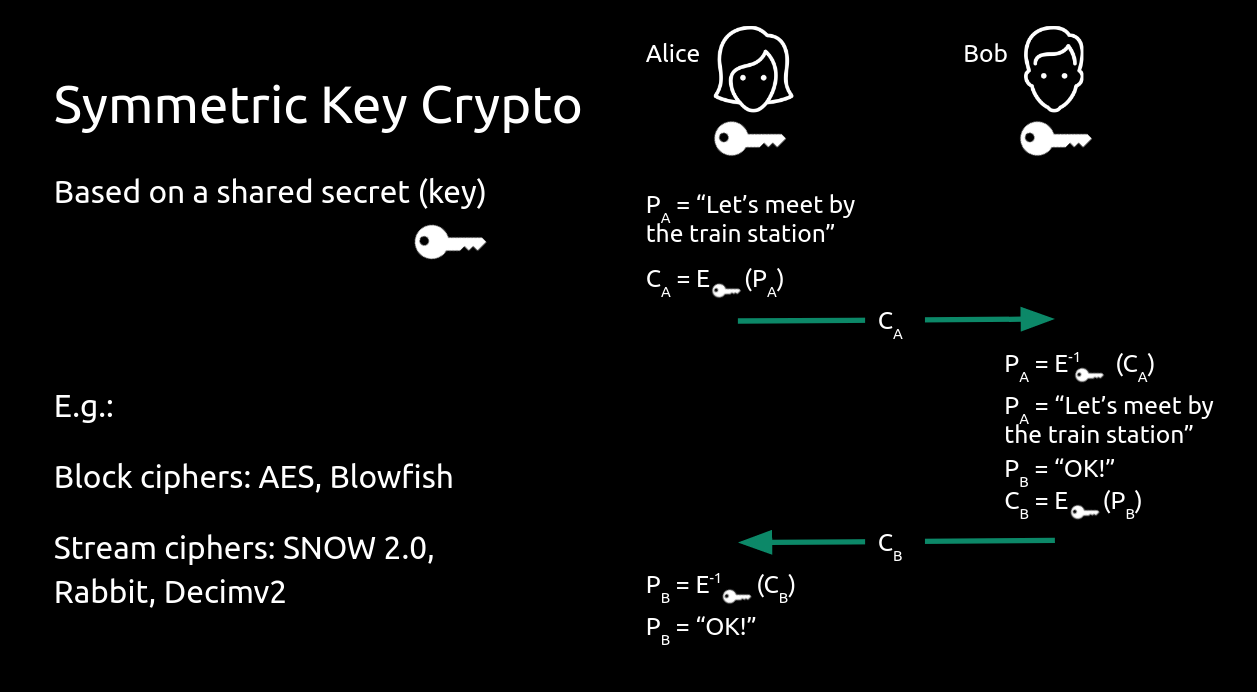
Some well known block ciphers:
Some well known stream ciphers:
Public Key Crypto
Also known as asymmetric key cryptography, these scheme use pairs of keys:
- a public key, which can be widely distributed and does not need to be kept secret
- a private key, which only the user should know, and must be kept secret
There is a mathematical relation between the two keys. The idea is you encrypt with someone's public key, and only they could decrypt the message, as only they should possess the private key to match the public one.
Public key cryptography is more computationally expensive, and it is often used to establish a secure communication channel on which symmetric keys can be exchanges.
In fact, public key cryptography is the base on which all our secure internet communications is built upon (e.g. Hypertext Transfer Protocol Secure (HTTPS), which uses Transport Layer Security (TLS) to encrypt traffic)
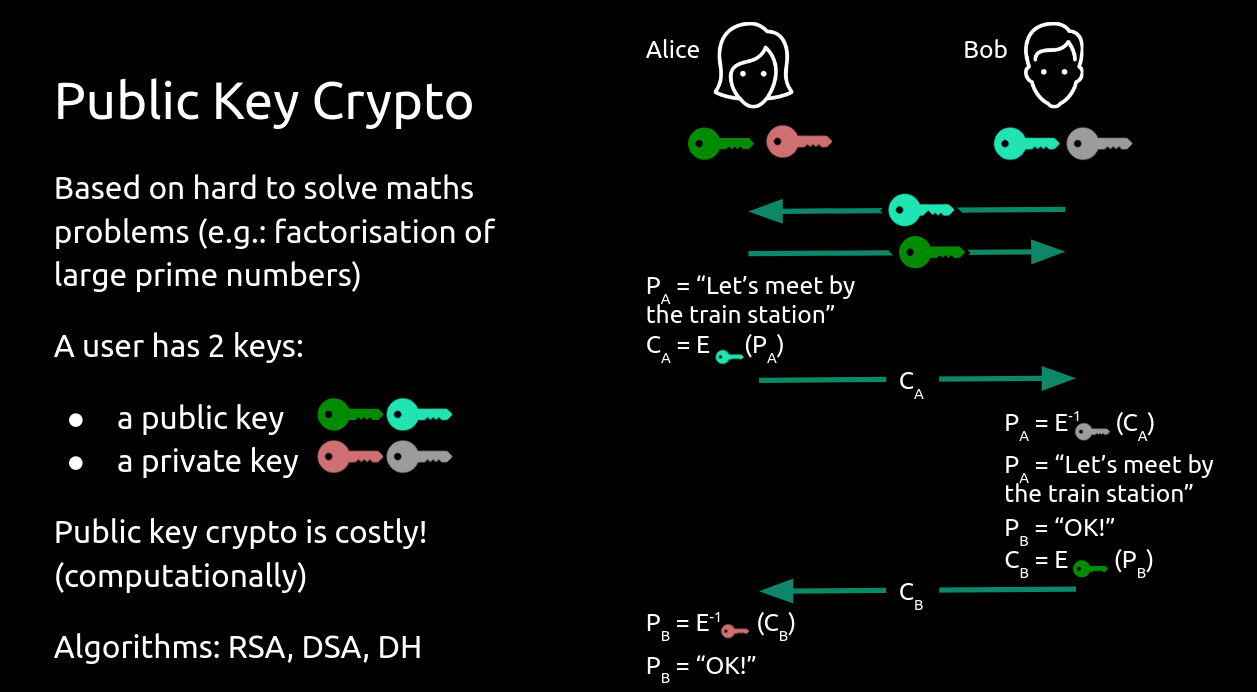
Some well known public key crypto algorithms:
- Diffie-Helman key exchange protocol
- RSA (appears often in CTF challs)
- ElGamal
- Elliptic-curve crypto
Hashes
While symmetric and public key crypto schemes allow you to both encrypt and decrypt a message (so the operation is reversible), hashes are one-way functions that map data of an arbitrary length to a fixed-size value. Hash functions are meant to be impossible to reverse. All you can do is guess the input and verify if the computed hash is the one you expect.
Because hashes have a fixed length output, and the input can be of any size, the mapping between them is limited. This is where the collision resistance property of a hash function becomes very important. A collision, in a nutshell, means that two (different) inputs, hash to the same output. Hash functions try to minimise the chance of this happening, therefore hash length is an important factor.
e.g. if I had a hash function with a 1 byte output, the data I hash could take one of 256 values. Finding 2 inputs to hash to the same value would be easy!
Hash functions are often used to send passwords over the internet. Instead of sending the actual password, the hash is transmitted. Therefore, if it is intercepted, an attacker would have to try and bruteforce it. A common method of bruteforcing passwords is to use a dictionary attack, whereby words from a list are hashed and the output is compared to the hash you are trying to break. You can get creative with this, as you can try different ways of constructing the passwords. E.g. people may use one word and their birthday, or use 1337 speak when constructing their password.
Two great tools to help in hash cracking are
You would also need a good word list, the most famous one being rockyou
Some well know hash algorithms:
Session material + resources
Primers + explanations
- AES
- RSA (with some implementaions and demos) - you might have to scroll down a bit for the theory
- Some common RSA attacks
Challenges
- If you like OverTheWire-style challenges, have a go at Krypton.
- Another good set of challenges is CryptoHack
- If you prefer a more tutorialised, guided walk of cryptography and cryptanalysis, check out CryptoPals.
- For more CTF-style challenges, check out PicoCTF
- As ever, our CTF has some crypto challenges in the bank.
Handy tools
Happy hacking :)
Reverse Engineering
- This week we are looking at reverse engineering challenges
- Reveng focussing on breaking down and understanding how a program works so you can achieve a specific goal (work out an input, run a specific code path, etc.)
- This category will use some knowledge from PWN and Crypto that week covered in previous weeks
Useful tools for today!
- Disassembler/Decompiler - there are a few options so choose what looks best to you!
- Ghidra - Open Source, made by the NSA, been around for a long time so very mature with good ISA support
- IDA - Closed source, used widely by professionals, free version available (need to make an account), only supports x86 + cloud decomp, fairly intuative and easy to use
- Binary Ninja - Partial open source, newer than the other two but gaining a lot of popularity, free version available, everything runs locally
- GDB (The GNU Debugger) - debug binaries, look at execution and memory, test your payloads, would recommend installing PwnDBG or GEF as they provide nice register/stack/code views
- WindDBG/x86Dbg/x64Dbg - similar to GDB but for windows binaries instead
- CyberChef
- dcode
Today's challenges
- Rev category on our CTFd
- If you haven't registered an account yet make sure to grab the registration key from #logins on our discord!
- PicoCTF rev category
Christmas
For today's Christmas session, we have a load of festive challenges written by current and former AFNOM members! Feel free to pick and choose which to attempt based on what seems interesting to you. Have fun! :)
Note: For challenges not on the CTFd instance, we may or may not have the flags. If you solve them, let one of the board know and we can check.
Skinnylegs' Mini CTF (@skinnylegs)
Go to https://ctf.afnom.net and try the following festive challenges:
- (Pwn) Christmas Oriented Programming
- (Forensics) Instant Christmas Merriment Protocol
- (Web) Bashing Through The Snow
- (Rev) Encryptmas Carol
Epic Festive Fun (flaberpengu + Azura)
ON https://ctf.afnom.net, try Epic Festive Fun - a fun little festive OSINT challenge!
Santa's Secrets (@leet_lemon)
Santa's been using a new password manager made by one of his elf interns! It's been very useful for him, he doesn't have to write down all the security codes for his North Pole factories anymore, which means he doesn't need to use as much paper, and is better for the environment.
But he's forgotten the password, and can't remember how to get in... Any chance you can work out how to open and decrypt his database?
Q1JQV2h0dHBzOi8vcGFzdGViaW4uY29tL1N6UE0wbTYyAAAAAAAAAAAAAAAAAAAAAAAAAAAAAAAA
AAAAAAAAAAAAAABzYW50YQAAAAAAAAAAAAAAAAAAAAAAAAAAAAAAAAAAAAAAAAAAAAAAAAAAAAAA
AAAAAAAAAAAAAAAAAAAAAAAAACqjezcUMowhgewDEn0xL1uYr/5bvX4ue6Kn/er9q4hGT09gL/V2
/CZpOMUXMeZyQxJpC2xF1I73r60nRQ6Ht6RUzBQwJ/69aQifNtF4MP7q+TKZNg4nhzU2kEpp8+9j
VMjGVHc2lp5UveDDbOAnRUEh6qRUAK1jJ/7wAzufNgUSY/7qLcvMNg5aIWg2kH0DJ+9jh2L5VHdp
MNFUvRRdn+AneNpU6qSHmeBjJzKKNjufaZ5FY/4exv7MNkHzVGg2wxc2J++WIZX5VKoDY9FU8K2Q
n+BaEg5U6tchzOBjWsu9NjvSA9FFYzK3+f7MadonVGhpXUo2JyMwVJX5h0Q2Y9GHiuCQnxTzRQ5U
HnFUzOCW8/69Nm5sNtFFlsvq+f4AAw4nVJsDkEo2WrxjVJUtIXc2YwUhveCQ0q0nRQ6Ht6RUzBQw
J/69aQifNtF4MP7q+TKZNg4nhzU2kEpp8+9jVMjGVHc2lp5UveDDbOAnRUEh6qRUAK1jJ/7wAzuf
NgUSY/7qLcvMNg5aIWg2kH0DJ+9jh2L5VHdpMNFUvRRdn+AneNpU6qSHmeBjJzKKNjufaZ5FY/4e
xv7MNkHzVGg2wxc2J++WIZX5VKoDY9FU8K2Qn+BaEg5U6tchzOBjWsu9NjvSA9FFYzK3+f7Madon
VGhpXUo2JyMwVJX5h0Q2Y9GHiuCQnxTzRQ5UHnFUzOCW8/69Nm5sNtFFlsvq+f4AAw4nVJsDkEo2
WrxjVJUtIXc2YwUhveCQ0q0nRQ6Ht6RUzBQwJ/69aQifNtF4MP7q+TKZNg4nhzU2kEpp8+9jVMjG
VHc2lp5UveDDbOAnRUEh6qRUAK1jJ/7wAzufNgUSY/7qLcvMNg5aIWg2kH0DJ+9jh2L5VHdpMNFU
vRRdn+AneNpU6qSHmeBjJzKKNjufaZ5FY/4exv7MNkHzVGg2wxc2J++WIZX5VKoDY9FU8K2Qn+Ba
Eg5U6tchzOBjWsu9NjvSA9FFYzK3+f7MadonVGhpXUo2JyMwVJX5h0Q2Y9GHiuCQnxTzRQ5UHnFU
zOCW8/69Nm5sNtFFlsvq+f4AAw4nVJsDkEo2WrxjVJUtIXc2YwUhveCQ0q0nRQ6Ht6RUzBQwJ/69
aQifNtF4MP7q+TKZNg4nhzU2kEpp8+9jVMjGVHc2lp5UveDDbOAnRUEh6qRUAK1jJ/7wAzufNgUS
Y/7qLcvMNg5aIWg2kH0DJ+9jh2L5VHdpMNFUvRRdn+AneNpU6qSHmeBjJzKKNjufaZ5FY/4exv7M
NkHzVGg2wxc2J++WIZX5VKoDY9FU8K2Qn+BaEg5U6tchzOBjWsu9NjvSA9FFYzK3+f7MadonVGhp
XUo2JyMwVJX5h0Q2Y9GHiuCQnxTzRQ5UHnFUzOCW8/69Nm5sNtFFlsvq+f4AAw4n
THE PEAR TREE (@hendo)
Can you figure out the secret of the magical pear tree?
Download the zip archive from: https://github.com/Jrhenderson11/THE_PEAR_TREE
The Elves (@raine)
Santa's Elves have lost a flag! They tried their hardest to write a script to retrieve it, but they need your help to finish it off!
Starting point is available from here
Hack Hanukkah (@heavyimage)
Our Hanukkah website seems to have broken this year and the programmer who built it using some non-standard technolgies is AWOL! Can you fix the site by relighting all 8 candles and saving the holiday?!
To help, run a local copy of the site with docker: sudo docker run -it -p 5000:5000 -p 564:564 heavyimage/hack_hanukkah. Then visit http://localhost:5000/ in your browser!
Author note: no need to dissect the docker image -- the expected entry point is just the web page on port 5000 🙂
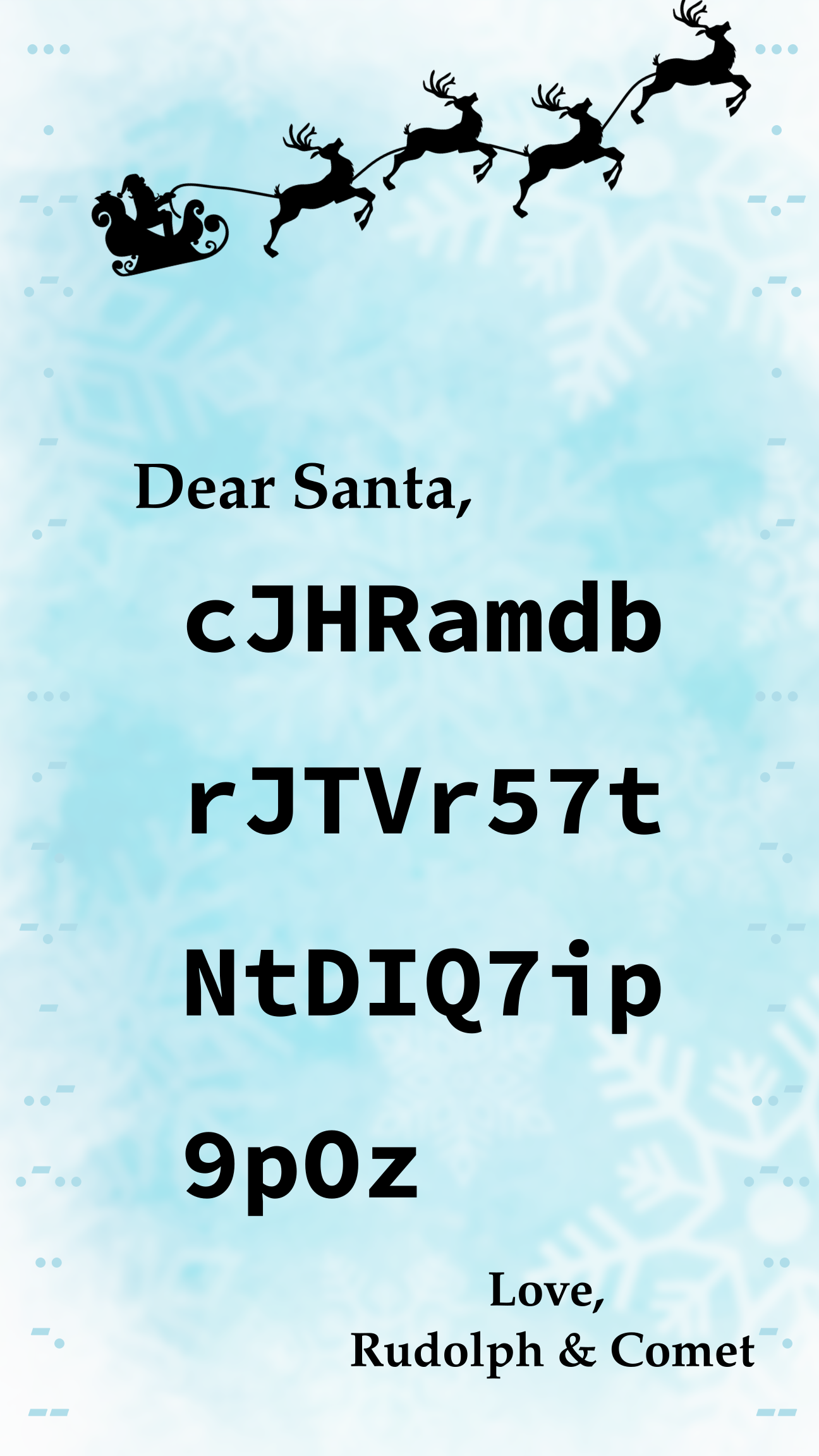
Santa's Reindeers
Challenge description:

Challenge (non-standard flag format):
Android Hacking
- This week we are learning how to hack android apps
- We should have some root phones but not enough for one each
- Make sure to install an android emulator (we recommend genymotion) so you can still do the challenges
- Alternatively if you do have your own already rooted devices feel free to bring them!
- Warning! We do not recommend rooting your personal phone/device! This can be a big security risk to you and may lead to some apps and functionality (e.g banking apps) not working.
Todays slides
APKs for today:
- Uncrackable 1 and 2: https://github.com/OWASP/owasp-mstg/tree/master/Crackmes
- Crackme 2 and 3: https://persianov.net/crackme-challenges-for-android
Bytecode viewer
Frida
- pip3 install frida frida-tools ###Download Frida Server:
- https://github.com/frida/frida/releases
- Version 17.6.2 is broken so get 17.6.1
- frida-server-
-android-x86_64.xz for emulator - frida-server-
-android-arm64.xz for phones
- frida-server-
Genymotion Android Emulator
Installing
- Genymotion is an android emulator that can give you a full, rooted phone on your laptop
- Installation guides can be found with the download links
- Genymotion does need an account to use, but if you select "Personal use" during setup and agree to their terms then thats all you need
- Troubleshooting step: If you already have VirtualBox installed it may still prompt you to install again, if it is trying install an older version of VBox than you already have then skip the VBox installation.
Phone setup
- Once Genymotion is installed and set up you need to create a phone to use
- We would recommend a Custom Phone with Android 11 and leaving all other settings as default
- It must be on Android 11 or lower as Genymotion will make you pay to have the device rooted on newer versions of Android.
- Now you can boot the phone and start using it! :)
Memory Forensics
- This week we are learning about memory forensics!
- Memory forensics involves analysing memory dumps from computers to find information about how the computer has been used
- This may be done by looking at files, logs, processes, etc.
Volatility3
- Our tool of choice for today!
- Open source memory dump analysis framework
- Provides lots of tools for pulling information and data about a computer from the memory dump
Installing
- Make and/or activate your venv
python3 -m venv venv && . venv/bin/activate
- Install using
pipor build from the githubpip install volatility3- Volatility3 github
Running
vol -f <path to memory image> <plugin> <plugin_option>- Further docs and tutorials
Challenges
- Memory forensics challenges from ctf.afnom.net
Grimace's SauceandPassword
- Volatility Labs on cyberdefenders.org
- CyberDefenders needs a free account to access labs
- Volatility3 labs
- Older labs (hints/solutions provided may not be applicable to vol3)
Blockchain
This week is dedicated to blockchain and cryptocurrency.
Cryptocurrency is complex and varied because it combines different technologies, rules, and ways of running networks. Each cryptocurrency works differently, with its own way of creating coins, confirming transactions, and keeping the system secure. It's seen as part of the future because it powers Web3, a more open internet where people can trade, interact, and control their digital assets directly without relying on banks or big companies. This is known as decentralisation.
The most important and popular systems are Bitcoin and Ethereum.
For more technical definitions you can read this paper.
Session Slides
Since today's topic is new and quite complicated, we are providing today's slides for reference.
Useful resources for today
- The solidity contracts guide
- Foundry installation guide
- Blockchain uses a lot of cryptography so please make use of our cryptography session
- Blockchain also uses a lot of web concepts so go have a look at our web session for a quick refresher
Today's challenges
History and Motivation
Cryptocurrency can seem very abstract at first glance. Its origins trace back to growing dissatisfaction with the traditional financial system, in particular right after the 2008 financial crisis which exposed weaknesses in centralised banking. In 2009, pseudonymous Satoshi Nakamoto launched Bitcoin, introducing a peer-to-peer digital currency that operates without banks or governments. By incorporating blockchain technology, which was proposed long before, Bitcoin allowed people to transfer value securely over the internet without relying on trusted intermediaries.
The broader motivation behind cryptocurrency is to create a financial system that is more transparent, accessible, and resistant to censorship. Over time, platforms like Ethereum expanded this idea beyond digital money by enabling smart contracts and decentralised applications. Together, these innovations aim to give individuals greater control over their assets while reducing dependence on centralised institutions.
Blockchain topics are still considered relatively new and actively researched (that includes this very Institution), with new primitives being developed to improve scalability, privacy, and security.
(Note that Ethereum underwent The Merge and the the White paper is outdated)
WiFi Hacking
- Today we are looking at how to hack WiFi networks in a (semi) realistic environment
- We have looked at the different types of security on networks
- Open, WEP, WPA
- And some of the different attacks available
- Recovering passwords, password cracking, deauthentication, etc.
- Now its your turn to have a go at hacking a network!
aircrack-ng
- A suite of WiFi hacking tools
- Usually entire suite in your package manager as 'aircrack-ng'
- Alternatively download from their site
- Tools included:
- airmon-ng: Switch NIC to monitor mode
- airodump-ng: Capture packets (and save them if requested)
- aireplay-ng: Inject packets (de-auth, replay)
- aircrack-ng: Crack password from captured packets
Wireshark
- GUI application for viewing network traffic and packets
- Hopefully you will have used this before in network forensics
Setup today
- We have a WPA2 network running - SSID: cool_secure_afnom_network
- It's up to you to hack it!
- There is a device connecting/connected to this network
- If you are deauthing ONLY DEAUTH THIS DEVICE NOT THE WHOLE NETWORK
- If you knock over the whole network the finite amount of monkeys will be released to get you!
- We have some USB NICs if your laptop cannot going into monitor mode but also feel free to work together!
Challenges
- There aren't any specific challenges for today
- Have a play around with monitor mode!
- Try hacking the network we have set up!
- See if you can crack the password!
- You could even set up your own hotspot/network if you want to try something specific or at home!
Take a look at the network with monitor mode, try and hack it, and have some fun!
Happy hacking!
Active Directory
Tools
- NetExec
- Impacket
- Kerbrute
- Impacket
- Bloodhound
- Certipy
- Google!!
- Hacktricks
- Writeups
- Github